

Contents 11 sections
- What Are Trust Signals in E-Commerce?
- Why Are Trust Signals Important?
- What Are Experience, Expertise, Authority and Trust?
- Which Trust Signals Should Your Store Have?
- How Do Search Engines Read Trust Signals?
- How Do You Prepare a Page-by-Page Trust Signal Checklist?
- When Do Trust Signals Weaken?
- How Are Trust Signals Measured?
- How Do Trust Signals Differ from These Related Topics?
- How Do You Manage Trust Signals with Faprika?
- Frequently Asked Questions
When a customer first visits your store, they may like the product and find the price fair; and still leave without adding anything to the cart. That is because in shopping the decision is made not only about the product but also about the seller: Is this company real, will the product arrive when I pay, who can I reach if something goes wrong, can I return it? If your pages do not answer these questions, the customer is not convinced. Search engines ask a similar question in their own way: Is this site trustworthy enough to recommend to users?
In this guide we cover the question of what trust signals are in e-commerce, that is, the signs customers and search engines read about your store's credibility. We translate experience, expertise, authority and trust into store language; we examine signals such as About, Contact, returns and delivery policy, company information, secure connection, reviews, author and corporate information one by one, and provide a page-by-page checklist. At the end you will find common mistakes, notes about Faprika and a six-question FAQ.
What Are Trust Signals in E-Commerce?
Trust signals are visible and invisible signs showing that an e-commerce site is run by a real, transparent and trustworthy business. The customer sees these on the page with their own eyes; the search engine tries to read them from the page content, the site structure and external signals related to the site.
Dividing trust signals into two groups makes the job easier. Visible signals are the things the customer notices directly: contact details, product reviews, return terms, payment methods, the lock icon in the address bar. Infrastructure signals work behind the page: secure connection, properly working pages, correct redirects, structured data, fast and stable loading. The two complement each other; even the best About page gets lost in a footer with broken links, and flawless infrastructure does not inspire trust if it does not say who the company is.
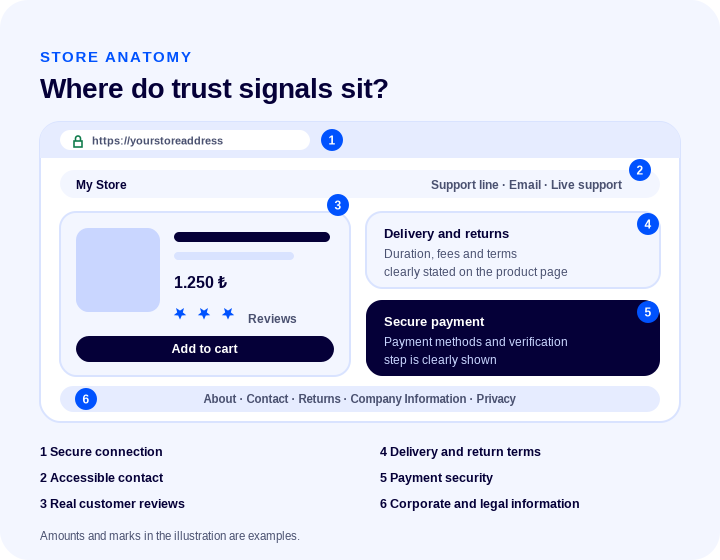
The illustration numbers six signs: the secure connection in the address bar, contact details in the top area, reviews on the product, delivery and return terms, the display of payment security, and the corporate and legal links in the footer. In the later sections of this article we cover each of them separately.
Why Are Trust Signals Important?
Trust signals matter because in online shopping the customer cannot touch the product or see the seller face to face; the only material they have when deciding is the signs on the page. If these signs are missing, even the best product is met with suspicion.
Its importance needs to be seen from two different angles:
- From the customer's side. Missing or unclear information is one of the common reasons for giving up at the payment step. If the shipping fee only appears at the last step, if the return condition cannot be found, or if it is unclear whom to contact when a problem arises, the customer leaves the cart. To win back a customer who abandons their cart, the clarity of this information matters as much as site speed.
- From the search engine's side. Search engines try to recommend useful and trustworthy pages to users. E-commerce pages, where money changes hands, carry a higher trust expectation because they concern the user's money and personal information. A site that meets this expectation and says clearly who it is and how to reach it is a candidate to earn extra points in quality assessment. It would not be accurate to say that a single trust score determines rankings; trust is a whole assessed together with content quality, page experience and topical fit.
- From the brand's side. A store that inspires trust gets repeat orders, is recommended and is searched for by its brand. This in turn indirectly feeds external signals such as backlinks and brand mentions.
What Are Experience, Expertise, Authority and Trust?
Experience, expertise, authority and trust are four quality dimensions used in evaluating a page and the site that publishes it. Abbreviated in English, it is known as E-E-A-T and is widely used as a framework describing search engines' understanding of quality. These are not individually measured scores but an impression drawn from the site as a whole.
Trust is the one at the center of the four; the other three can be read as elements that feed trust. For a store, their counterparts are as follows:
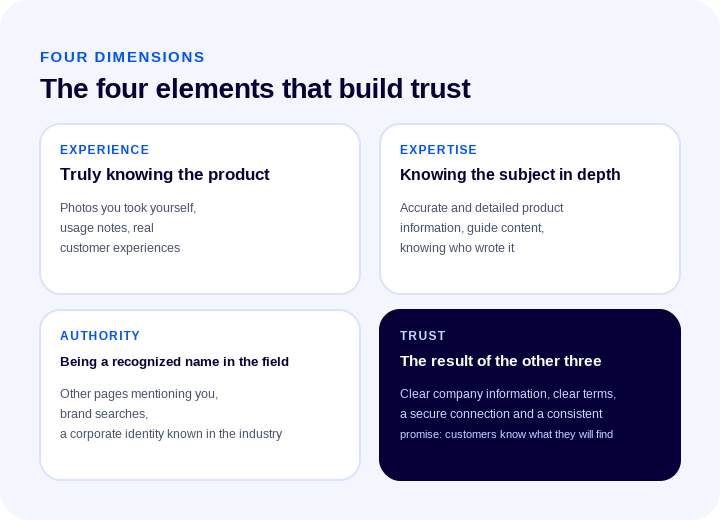
| Element | What does it mean? | Counterpart in the store |
|---|---|---|
| Experience | Having genuinely used or seen the product or service | Product photos you took yourself, usage notes, real customer reviews, and images from packaging and shipping processes |
| Expertise | Knowing the subject accurately and in depth | Detailed product information, size and care guides, content with a clearly identified author |
| Authorization | Being a recognized, frequently cited source in your field | Other pages mentioning you, searches made with your brand name, a corporate identity known in the industry |
| Trust | The customer knowing in advance what they will find | Clear company information, transparent terms, a secure connection, and promises that are kept consistently |
The conclusion from the table is this: producing trust signals is less a separate “SEO task” and more about describing your business honestly on your pages. Trust built with fake badges or exaggerated promises falls apart at the first problem.
Which Trust Signals Should Your Store Have?
The basic trust signals an e-commerce site should have are a secure connection, business information, an about page, contact details, return and delivery terms, legal texts, payment security, customer reviews, author and expert information, and corporate information. We explain each one in turn below.
1. Secure connection (HTTPS)
A secure connection means the data flow between the customer's browser and your store is encrypted, and it appears as a padlock icon in the address bar. On an insecure connection the browser may show a warning, which immediately drives customers away from a site where they are about to pay. The whole site, not just the checkout page, should open over a secure connection, old addresses should redirect to the new one, and no mixed content should remain on pages. To learn what a certificate is, its types, and what happens when it expires, see the what is an SSL certificate article.
2. Business information
Business information is the data that says “this company really exists”: the official company name, address, tax details, registration numbers, and the account details needed for payment. Even if customers don't look at it, its presence builds trust; a customer who does look and can't find what they need becomes most suspicious at that moment. The information is gathered on a single page linked from the footer and kept up to date. Faprika's own business information page is an example of this approach: company details sit in one place and are easy to find.
3. About page
The about page explains who the brand is, what it sells, why it can be trusted, and who stands behind it. A real team photo, the founding story, the way of working, and the promises made to customers belong here. This page often seems like the least visited one, yet it is the first stop for a customer who has doubts. For how to write it and which fields to fill in, take a look at the how to write an about page guide.
4. Contact details
Contact details show the customer that they can reach you when there is a problem. Phone, email, a clear address, opening hours, and, where available, live support or a messaging channel belong to this group. What matters here is not only that the details exist but that they work: an email address that gets no reply or a phone that nobody answers can leave a worse impression than providing no details at all. It is also important that the details are the same on every page; one phone number in the header and another on the contact page is a sign of inconsistency.
5. Return and delivery policy
The return and delivery policy is your written answer to the customer's pre-purchase question, “what happens if something goes wrong?” Delivery time, shipping cost and the free shipping condition, how return and exchange rights are exercised, product groups that cannot be returned, and how refunds are made should be written in a clear and simple language. Making legal language understandable is part of building trust. To set up the process on the operations side, the how to manage the returns process in e-commerce article helps, and for the contract side, the distance sales contract article.
6. Legal texts and privacy
The distance sales contract, the privacy and information notice, the cookie policy, and the texts on personal data protection are as much a trust signal as a legal requirement. When filling in a form and paying, the customer wants to see how their data will be used. The texts should be linked from the footer and the payment step, kept up to date, and genuinely describe your store's practice; a generic text copied from another site does harm when it contradicts that practice. For details, see the e-commerce KVKK compliance article.
7. Showing payment security
Payment security means the customer feeling safe while entering their card details. Clearly showing the accepted payment methods, stating that payment is taken over a secure connection, and telling the customer in advance that the bank's verification step will occur all support this feeling. Displaying a badge you do not use or have not earned, on the other hand, destroys trust once it is verified. For how trust marks are obtained and used correctly, see the relevant guide: trust badge in e-commerce.
8. Customer reviews
Customer reviews are what others, not you, say about your store, and they are one of the strongest trust signals. Reviews should come from real customers, negative reviews should also be shown, and replies should be polite and solution-oriented. Reviews that are all five stars and resemble each other do not build trust; they even raise suspicion. The whole process of collecting, approving, and replying is explained in detail in the how to manage product reviews article.
We recommend readingHow to Manage Product Reviews?9. Author and expert information
If you publish guide content, blog posts, or product selection guides, showing who wrote the content is a signal of expertise. The author's name, a short bio, and their connection to the business answer the question “who is saying this?” Author information is never made up; the person or team that actually prepared the piece is named. This matters even more for content that touches sensitive topics such as health, law, or security.
10. Corporate information and brand consistency
Corporate information means the brand name, logo, address, phone, and social media accounts being the same everywhere. If the company name in your store does not match the name on the invoice or payment page, the customer hesitates. To communicate the same consistency to search engines, corporate details can be marked up with structured data; we return to this below.
11. Page layout and a working structure
Broken links, pages that do not open, slow-loading images, and a messy mobile appearance are also trust signals, because no one expects a carefully run shopping experience from a site that is not carefully managed. For managing error pages, take a look at what is a 404 page; for mobile experience, what is mobile SEO; and for speed and stability measurements, what is Core Web Vitals.
We summarize the signals above in a single table:
| Trust signal | Why does the customer look? | What does it mean for the search engine? | Where is it found? |
|---|---|---|---|
| Secure connection | Seeing that their data is protected | A basic security and quality expectation | All pages |
| Business information | Verifying that the company is real | A site whose operator is known | A page linked from the footer |
| About Us | Getting to know the people behind the brand | A sign of corporate identity and expertise | Menu and footer |
| Contact | Being able to reach you if there is a problem | A site that is accessible to users | Header, footer, contact page |
| Returns and delivery | Seeing the risk before buying | Pages offering clear and complete information | Product, cart, footer |
| Legal texts | Knowing how their data will be used | A sign of transparency and order | Footer, form, payment step |
| Reviews | Seeing other customers' experiences | A sign of real user experience | Product page |
| Author information | Knowing who the content comes from | A sign of expertise and accountability | Blog and guide pages |
| Working structure | Having a smooth shopping experience | A well-managed, stable site | Whole site |
How Do Search Engines Read Trust Signals?
Search engines do not read trust signals through a single setting or tag; they draw inferences as a whole from the content on the page, the site structure, and external signals. So there is no shortcut like “adding a trust tag,” but it is possible to make the search engine's job easier.
Three layers can be mentioned:
- Page content. Information such as contact details, return terms, company information, and the author's name should appear as plain text on the page. Information that exists only inside an image may not be readable; for this reason, footer text, business information, and policies are written as real text. The title tag and meta description, which clarify the page's subject and purpose, are part of this whole as well.
- Site structure. The pages that provide trust need to be crawlable, indexable, and reachable from the home page in a few clicks. Accidentally blocking the about and returns pages from crawling deprives the site of trust signals. In this respect, robots.txt and sitemap settings should be checked; the breadcrumb that shows the page's path and internal links between pages also help.
- Structured data. Corporate details such as company name, logo, address, and contact information can be marked up with structured data in a form machines understand. This is not a ranking guarantee; it only helps the information to be read correctly.
A shortened example of how corporate information can be marked up with structured data is as follows (the address and values are examples):
<script type="application/ld+json">
{
  "@context": "https://schema.org",
  "@type": "Organization",
  "name": "Mağazanızın Adı",
  "url": "https://magazaadresiniz",
  "logo": "https://magazaadresiniz/logo.png",
  "contactPoint": {
    "@type": "ContactPoint",
    "telephone": "+90-000-000-0000",
    "contactType": "customer service"
  }
}
</script>
The information in this markup must be exactly the same as the information visible on the page. Marking up information that is not on the page or does not reflect reality can harm the site instead of building trust. For where and how to apply it, see the what is structured data article.
Finally, trust signals also have an external side: other pages mentioning you, searches made with your brand name, and customers' reviews on other platforms. You cannot manage these directly, but you influence them indirectly through good service and accurate content; for the link side of this topic, the what is a backlink article is useful.
We recommend readingWhat Is Structured Data?How to Prepare a Page-Based Trust Signal Checklist
The most practical method is to run the trust audit by page type, because each page has to answer a different question in the customer's mind. The home page answers “who is this store?”, the product page “can I trust this product?”, and the cart page “can I trust it with my money?”
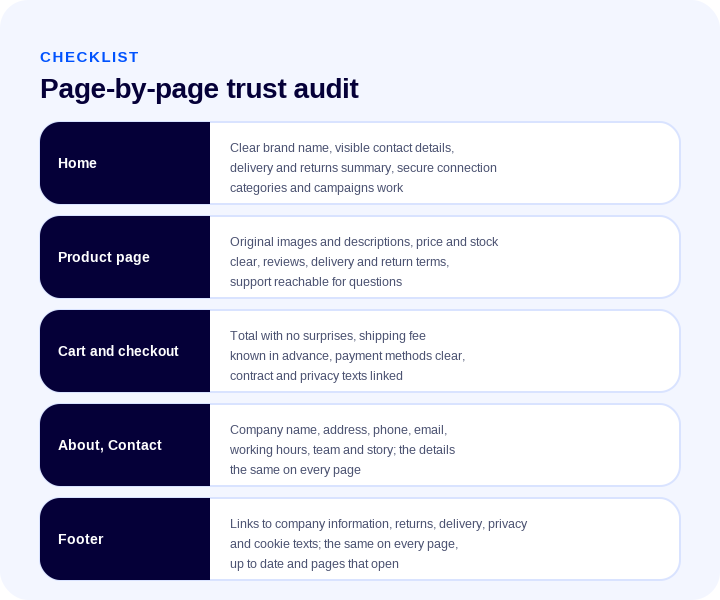
We also provide the checklist in the illustration as a table you can copy and use:
| Page | What to check |
|---|---|
| Home | Brand name and logo clear; contact details visible; delivery and returns summary present; secure connection; categories and campaign links working |
| Product page | Original images and description; price and stock status clear; reviews; delivery and return terms; accessible support for asking questions |
| Cart and checkout | Total amount without surprises; shipping cost known in advance; payment methods clear; contract and privacy texts linked |
| About and contact | Company name, address, phone, email, opening hours; team and story; information identical on every page |
| Footer | Links to business information, returns, delivery, privacy, and cookie texts; links are up to date and open |
| Blog and guide | Author name and bio; publication and update date; original, subject-specific content |
When filling in this list, look not just at “is it there or not” but at “can the customer find it and understand it.” If a policy page exists but has no link in the footer, it counts as nonexistent for the customer.
When Do Trust Signals Weaken?
Trust signals usually weaken not through bad intent but through neglect: a piece of information changes but is not updated everywhere, a page is removed but its link remains, a campaign ends but its terms stay on the page. When the customer notices these inconsistencies, their trust in the store as a whole is shaken.
The most common situations are the following:
- Inconsistent information. Different phone numbers, addresses, or company names appearing on different pages.
- Outdated or copied text. Return and privacy texts taken from another site that do not reflect the store's actual practice.
- Artificial-looking reviews. Reviews that all follow the same pattern, are all five stars, and look as if they were written on the same day.
- Unearned badges. Trust icons that cannot be verified and made-up award graphics.
- Broken links. Policy pages in the footer that do not open, or menu items that lead to deleted pages.
- Hidden terms. A return or shipping condition appearing only in a small-print corner, or a surprise fee appearing at the last step.
- Unanswered contact. An email address that receives messages but is never answered, or live support that does not work.
- Incomplete secure connection. Some pages or images of the site being loaded from an insecure address.
None of these requires a big investment; regular auditing and single-source management are enough. If you suspect a technical problem, the how to do an SEO audit and what is technical SEO articles offer a systematic way to check.
We recommend readingHow to Do an SEO Audit?How Are Trust Signals Measured?
Trust signals have no single unit of measurement; to measure them, you look indirectly at customer behavior and feedback. The aim here is not to reach a single number but to find the missing point.
The following signs hint at a lack of trust:
- An increase in the number of customers who reach the product page and add to cart but abandon at payment; look at which step the abandonment happens at.
- Recurring questions to customer service such as “how do returns work?”, “how much is shipping?”, and “is the company real?”; every recurring question points to information that is missing or cannot be found on the page.
- The visit rate of contact, about us and policy pages; a visitor who often stops by these pages before paying is looking for reassurance.
- Words that often appear in reviews and feedback: “I couldn't trust it”, “I couldn't find information”, “I couldn't reach anyone”.
- The trend over time of searches made with the brand name in search results; it is an indirect indicator of brand awareness and trust. To learn how to read search data, see the how to read an SEO report article.
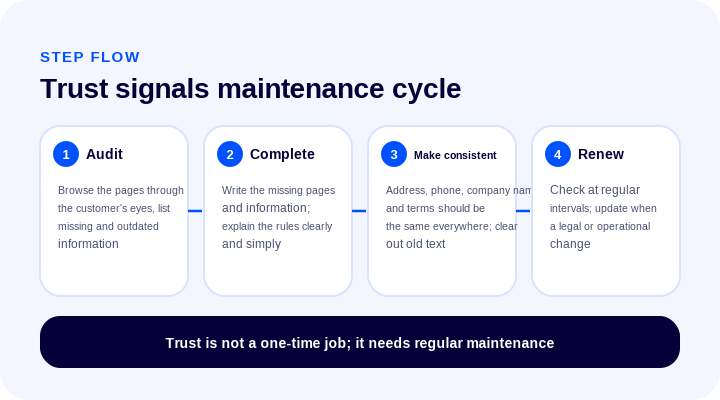
The healthiest way is to tie measurement to a regular maintenance cycle:
| Step | What is done? | How often? |
|---|---|---|
| Audit | Browse every page as a customer would and list the missing and outdated information | Every quarter and after major changes |
| Complete | Write the missing pages and information, and explain the rules clearly and simply | Right after the audit |
| Make consistent | Make the company name, address, phone and terms identical everywhere, and clean up old text | With every information change |
| Refresh | Keep policies and review replies up to date, reflecting any legal or operational change | Check at regular |
One point to watch is not to read too much into a single change in measurement. Trust signals work together; it is not always possible to separate which one affected the result and by how much. So first complete what is missing, then follow the overall trend.
How Do Trust Signals Differ From These Related Topics?
Trust signals overlap with many surrounding topics; since we write about each of them separately, it helps to clarify the difference. This is a pillar article: it explains which signals exist and how to audit them page by page; for topics where you need more detail, you can go to the relevant guide.
| Topic | Focus | For details |
|---|---|---|
| About us page | The brand's story and how to write the page | How to write an about us page |
| Secure connection | Certificate types, installation and renewal | What is an SSL certificate |
| Customer reviews | The process of collecting, approving and replying | How to manage product reviews |
| Trust badge | Verification badges and how to obtain them | What is a trust badge |
| Returns process | Returns operations on the business side | How to manage the returns process |
How Are Trust Signals Managed With Faprika?
In Faprika, many trust signals are managed with the management tools the store already uses. Which tool is available in which plan may vary by plan; for the current scope, see the e-commerce plans page.
- Search engine settings. Faprika plan features include canonical, title tag management, robots and sitemap settings; these settings make sure pages such as about us, returns and contact can be crawled and sit at the right address. You can see how to edit these fields in the control panel in the SEO settings training.
- Address and redirect management. Faprika includes a panel where you can manage 301, 302 and 410 redirects and address records. This tool is used so that the old link is not left broken when the address of a trust page changes; for the logic of the topic, see the what is a 301 redirect article.
- Bulk SEO and meta information updates. Updating the title and description information of many pages in bulk makes it easier to keep consistency.
- Product reviews. Faprika has a separate section for managing product reviews; for details, take a look at the product reviews management training.
- SEO reports. SEO reports are also offered depending on the plan; they can be a starting point for seeing missing pages and errors.
These tools do not produce the signal for you; the store owner provides the content and information. Faprika's role is to make it easier to publish this information at the right address, in a crawlable and consistent way. For the whole of general SEO settings, how to configure e-commerce SEO settings, and for page-level optimization, the what is on-page SEO articles are good complements.
Frequently Asked Questions
What are trust signals in e-commerce?
Trust signals are indicators that show an e-commerce site is real, transparent and reliable: a secure connection, business information, about us and contact pages, return and delivery terms, legal texts, genuine customer reviews and consistent corporate information. They tell both the customer and the search engine about the store's trustworthiness.
Do trust signals directly affect rankings?
It would not be accurate to say that a single trust signal directly determines rankings. Search engines evaluate trust together with content quality, page experience, site structure and external signals. Completing your trust signals works in your store's favor in quality assessment and also directly supports conversion.
What do experience, expertise, authority and trust mean for an e-commerce site?
Experience means truly knowing the product, expertise means explaining the subject accurately and in detail, authority means being a recognized source in your field, and trust means the customer knowing in advance what they will find. In a store, these correspond to original images and content, detailed product information, brand mentions and clear company information.
Which pages matter most for trust?
About, contact, company information, returns and delivery policy, distance sales agreement, and privacy and cookie texts. These pages need to be linked from the footer, up to date and readable as text; having short summaries on product and cart pages also makes the customer's decision easier.
How should I use customer reviews as a trust signal?
Collect reviews from real customers, publish negative reviews too, and reply to all of them politely and with a focus on solutions. Fake, near-identical or only positive reviews do not build trust; they raise suspicion. It is also important that reviews are visible in a prominent place on the product page.
How often should I check trust signals?
A check every quarter is a good start. Also run an audit right away when your address, phone, company name, shipping or return terms change, when a new payment method is added, or when the site's structure changes.