

What Is Advanced Script Management?
Advanced Script Management is a Faprika app that lets you add your own scripts (JavaScript) and CSS code to your e-commerce site, customizing its design and functionality beyond the limits of a ready-made theme. You write the code, preview it first in a test release, publish it on a test domain, and go live when you are ready; if something goes wrong, you roll back from backups. You can also connect your own AI tools via MCP to Faprika, such as ChatGPT, Claude, Gemini and Copilot, and write your site's code together with them.
It suits businesses that want their site to match their brand identity exactly and that work with their own software team, agency or AI tools: you build the custom design with your own code and add new buttons, windows and interactive areas to pages.
What Can You Do?
- Write script and CSS: Add JavaScript and CSS code directly from the Faprika panel. Place any code you want on your site for buttons, windows, banners, interactive areas and custom design.
- Preview in the test release: See your change in the test release without showing it to live customers.
- Publish on the test domain: Publish the change on the test domain first and try it under conditions close to the real site.
- Roll back from backups: If a change doesn't turn out as you expected, return to an earlier backup.
- Connect your AI: Connect your own AI tools such as ChatGPT, Claude, Gemini and Copilot to Faprika via MCP, and write your site's code together with them.
How Does Script Management Work?
In the Faprika panel, follow Content Management >> Script Management and create a script area with Add New. In the Script Code field, write CSS code inside a <style> tag and JavaScript code inside a <script> tag. You give each area a unique name; this way you tell the code you add apart, and can disable or delete it when needed.
Choosing where and for whom the code runs
With the Page Position setting, you decide whether the code is placed in the <head> tag (header) or at the end of the <body> tag (footer). With the language selection, the code runs in only one language or in all languages. With the Restricted User Group setting, you limit the code by user group; for example, you can make sure it is not added for visitors who are not members.
Page-type-specific code with parameters
If your code uses parameters such as product information, you choose the parameters you want with the Parameters Active option. Parameters work only on the page types where they apply; if you use a product parameter, you select the page type as product.
Test First, Then Go Live: Publish with Confidence
Faulty code can break the look of your site. To reduce this risk, Advanced Script Management lets you see a change before it goes to the live site.
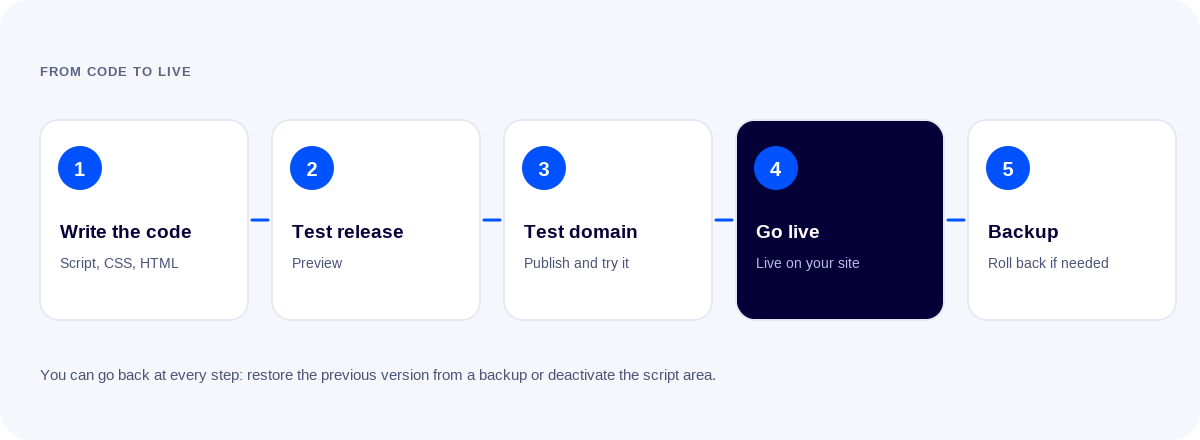
- Write the code: Add your script and CSS to the script area.
- Preview in the test release: See the change in the test release; check how the page looks and works without showing it to live customers.
- Publish on the test domain: If needed, publish the change on the test domain and try it together with your team or agency.
- Go live: If you are happy with the result, take the change to the live site.
- Roll back if needed: In an unexpected situation, return to the previous version from backups. You can also deactivate the relevant script area without deleting it.
Let Your AI Code Your Site With You
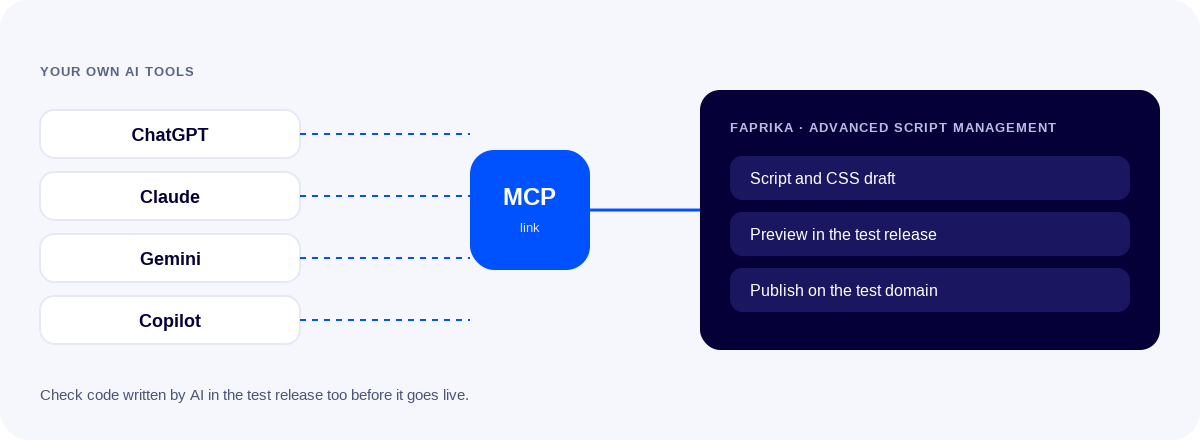
You no longer need to wait for a developer to write code. With Advanced Script Management, you connect your own AI tools to Faprika via MCP, such as ChatGPT, Claude, Gemini and Copilot; the AI writes, edits and improves your site's script and CSS code for you. Describe your dream design in a single sentence and get the code ready.
MCP (Model Context Protocol) is an open connection method that lets AI tools connect to external systems in a standard way. In other words, you connect your tool once and work with whichever AI you prefer. Your subscription and your choice stay with you.
What can you have AI do?
- Change the design by talking: Have a request like “Make the product cards rounded and show the price larger” turned into CSS code.
- Add new functions instantly: Have the script written for a button, pop-up window, countdown or interactive section.
- Improve existing code: Have your old script simplified, its bugs found, and ask for an explanation.
- Speed up testing ideas: Have several versions of the same design written and pick whichever looks best.
Code written by AI can also contain mistakes. So check every change on the test preview before going live; if a problem appears, restore from a backup. This way you benefit from the speed of AI while keeping your site's security in your own hands.
When to Use Advanced Script Management
| Need | Example |
|---|---|
| Custom design | Restyling the whole site with CSS that matches the brand's colors, typeface and layout |
| New function | Adding an "Order via WhatsApp" button or a live chat window to the home page |
| Page-type-specific code | Adding a section that works only on the product page |
| Language-specific code | Running the code in only one language or in all languages |
| Coding with AI | Having ChatGPT, Claude, Gemini or Copilot write your design and function requests and seeing them on the test preview first |
What Do You Gain with Advanced Script Management?
- Custom site design with your own code
- Adding script (JavaScript) and CSS code from the panel
- Preview in the test release and publishing on the test domain
- Rolling back from backups
- Connecting your own AI tools such as ChatGPT, Claude, Gemini and Copilot via MCP and writing code together
- Placement of the code in the header or footer section
- Restriction by language and user group
- Use of parameters tied to the page type
- Deactivate code without deleting it
For a step-by-step guide, see the Script Management tutorial. You can see which plan includes it on the E-Commerce Plans page.
Frequently Asked Questions
What is Advanced Script Management?
E-commerce add-on from Faprika that lets you customize design and functionality by adding your own script and CSS code to your site.
Can I write scripts and CSS?
Yes. You can add JavaScript and CSS code to the script area in the Faprika panel.
Can I see a change before it goes live?
Yes. You can preview the change in the test release, or publish it on the test domain and try it out.
Can I undo a change I made?
Yes. You can return to the previous version from backups, and you can also deactivate a script area without deleting it.
Can I connect my AI tools to Faprika and have them write code?
Yes. You can connect AI tools like ChatGPT, Claude, Gemini and Copilot to Faprika via MCP and write your site's script and CSS code together with them.
What is MCP?
Model Context Protocol is an open connection method that lets AI tools connect to external systems in a standard way.
Can I limit the code to specific pages or languages?
Yes. You can set the page position (header or footer), language, user group and page type.
Do I need coding knowledge?
Yes. Faulty code can break the look of your site; we recommend preparing the code with your own team, your agency or your AI tools and checking it in the test release first.
To use Advanced Script Management, you can open your free store or get in touch with us.